PWA Experience: A Complete Guide For Web Developers
Building solutions for web browsers were beginning to feel old-school with the trend of Android Developer and iOS Developer. But trust me, web developers are not letting this game slide.
In 2015, Alex Russell and Frances Berriman came up with the idea which later became one of Google’s biggest innovations.
The duo noticed that some developers were beginning to build web solutions that would take full resources from the browser. These developers, including myself, want everything running on the browser.
I personally hate the tag “Android Developer” or “iOS Developer.” I build for the web, so don’t box me into an operating system. <h1>I am a proud web developer.</h1>
With the presence of mobile smartphones, users are becoming lazy; they want to click on installed apps and have them opened and running. They hate having to type “www.anything.com” on the browser tab.
Web developers need to meet up with the idea of installation, real-time notification, and user interaction that takes place only on native applications.
With good knowledge of PWA or Progressive Web Apps, web developers can now build installable applications without having to be loyal to the Android Play Store or Apple App Store.
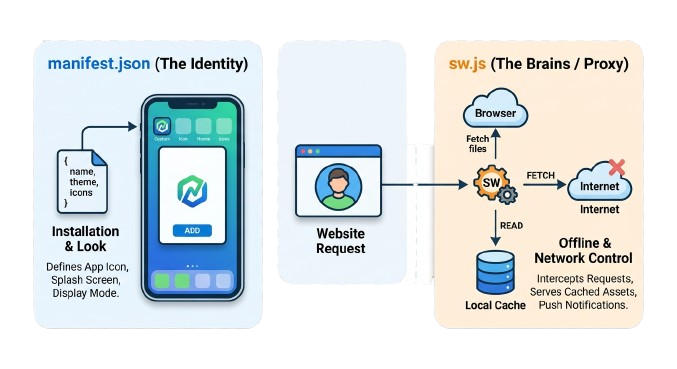
The good thing is that the problem was solved with just 2 files: sw.js and manifest.json. Adding these files to your project folder and linking them to your index file will make your website or web app installable on any device.
📖 To understand how to convert your Web App into a PWA, click here
What are PWAs?
— PWABuilder (@pwabuilder) October 7, 2024
- Built with HTML, CSS and JavaScript
- Can be installed from browsers and app stores
- Have access to "low level" capabilities such as background sync
- Run in their own Window, outside of the browser, just like any other apphttps://t.co/JBCUgJCGTI